
REVIEW · MALAYSIA
Malaysia eSIM (1 to 30 days. Up to 60GB of Data)
Good connectivity makes Malaysia easier.
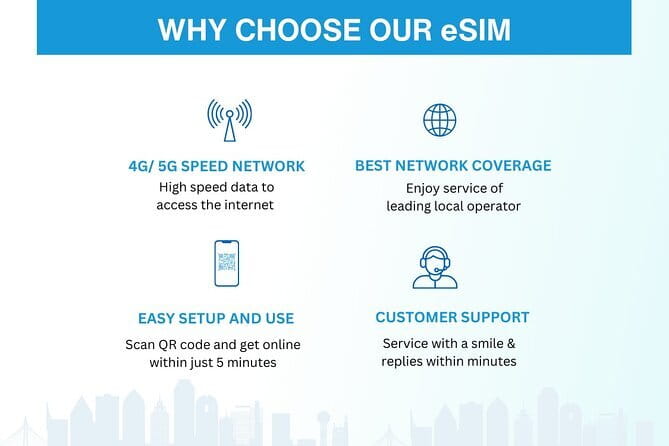
This Malaysia eSIM is built for quick setup, with an email-delivered QR code that gets you online fast, plus 4G/5G data at local rates while you explore. I also like that you can pick a plan length from 1 to 30 days and reach up to 60GB, so you are not constantly counting megabytes. The main catch to plan for is that eSIM activation requires internet and your phone must support eSIM tech.
Since this is a digital product, there is no meetup and no physical SIM shop detour. You start in the Kuala Lumpur area and the info points you toward the Petronas Twin Towers area, but your real “starting line” is your inbox. You also get remote customer service, which matters if the activation step does not go as smoothly as planned.
In This Review
- Key things to know before you buy
- Malaysia eSIM, what you are actually getting
- Before you leave: phone compatibility and the smart activation window
- Arriving in Malaysia: turning on data roaming and verifying it works
- Data caps, 4G/5G speed, and what “3G after the limit” means
- Kuala Lumpur practicality: using the eSIM where you actually need signal
- Switching carriers across countries without the SIM shop drama
- Remote customer service, the “activation is the only hurdle” advantage
- Price and value: is $7.90 per person a good deal?
- Who should book this eSIM, and who should think twice
- Should you book the Malaysia eSIM by Xplori?
- FAQ
- How long does the Malaysia eSIM work?
- How much data do I get?
- How do I activate the eSIM?
- When should I set up and activate the plan?
- Is there a physical meeting point or pickup?
- What happens after I use the high-speed data?
- Can I cancel for a full refund?
Key things to know before you buy
- Email QR code activation: you receive it digitally, not in person
- Choose your trip length (1 to 30 days): match the plan to your stay instead of forcing extra days
- Up to 60GB high-speed data: fast use for maps, calls, and streaming, then speed slows
- After the cap, speed shifts to 3G: you can still use data, but streaming may suffer
- Remote customer support: helpful when activation is the only speed bump
Still weighing it up? These Kuala Lumpur bookings kept coming back in our notes.
- Kuala Lumpur: Batu Caves Half-Day Tour with Pick-Up Option★ 4.5 · 4,288 reviews
- Private Half-Day Batu Caves and Cutural Tour in Kuala Lumpur★ 5.0 · 3,107 reviews
- Historical Malacca Guided Day Tour (Shared Tour)★ 5.0 · 2,172 reviews
- Kuala Lumpur: Sambal Street Food Tour with 15+ Tastings★ 4.9 · 1,657 reviews
Malaysia eSIM, what you are actually getting
An eSIM is the digital version of a SIM card. Instead of buying a physical SIM on arrival, you install the profile straight into your phone that supports eSIM. For a trip like Malaysia, this is usually all about saving time and keeping your phone usable from day one, not starting the vacation with a phone hunting quest.
Here, you get a plan that supports 4G/5G data at local rates across your time in Malaysia. The provider also frames it as flexible versus physical SIM cards or a rental WiFi router. That flexibility is real for travelers who want their phone to stay their main tool, whether you are using maps, translating menus, or messaging family.
One more point that matters: the product is strictly digital. There is no pickup and no meetup point to show up for. If you like certainty, that is good. If you rely on last-minute, in-person help, you will need to be more proactive with your setup.
Before you leave: phone compatibility and the smart activation window
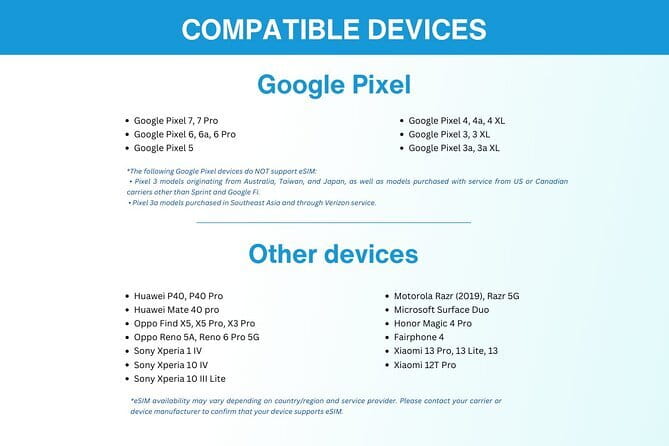
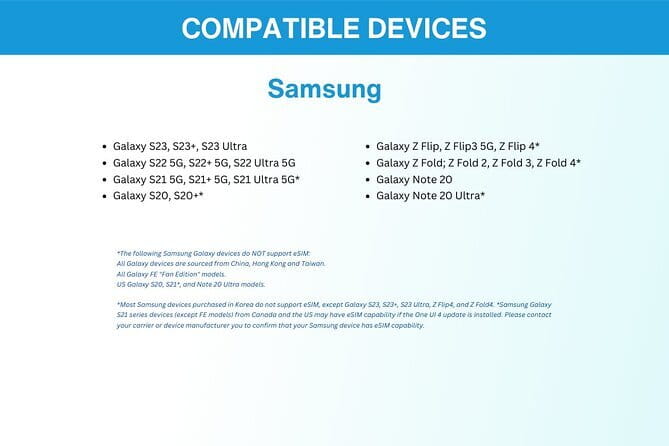
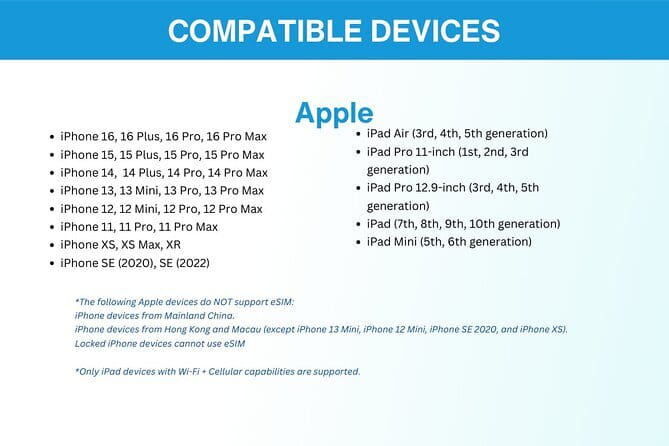
The setup is not complicated, but it is not automatic in the background either. You should check that your phone supports eSIM technology before you order. If it does not, you can end up with a QR code and no way to install the plan.
Activation timing is another big deal. The guidance is to set up your eSIM on the same day as your departure date. Then, once you reach Malaysia, you activate the data plan and enable data roaming. That two-step approach is common, but it helps to think of it like this: you are preparing on the way, then turning it on when you cross the border.
Also, internet access is required to activate the eSIM. That means you should not treat activation as something you do only after you land. I like the reminder to print the QR code and carry it during your trip as a backup. In the real world, phones die, chargers get lost, and WiFi passwords vanish at the exact wrong moment.
Arriving in Malaysia: turning on data roaming and verifying it works
When you land, the goal is simple: get your phone using the plan quickly and confirm that data is actually flowing. The instructions here are clear. Activate the data plan upon reaching Malaysia, then enable data roaming.
What you want right after that step is confidence. Your phone should show the data connection, apps should load without delays, and calling and messaging should behave normally. If you rely on your phone for rides, meeting points, or navigation, this is the moment to test.
A small, practical thought: if you run into trouble, do not keep flipping settings for hours. The service includes remote customer service, and the faster you ask for help, the less time you waste. In the positive feedback, fast fixes are a highlight, especially when activation hiccups happen.
Data caps, 4G/5G speed, and what “3G after the limit” means

The plan includes up to 60GB of data, with high-speed usage capped at that amount. After you use the included high-speed data, the speed switches to 3G.
This matters because 3G can feel fine for some tasks and frustrating for others. For example, you will likely still be able to check messages, use basic navigation, and browse lightly. But if you plan to stream video, do lots of photo uploads, or spend hours on social apps, you will notice the slowdown once you hit the cap.
So how do you make the most of your high-speed allowance? The best approach is to treat “fast” as your main work time. Use high-speed data for the things you really need: maps, messaging for coordination, and calls when you are on the move. For low-priority tasks, you can use WiFi when you find it. It is a simple habit, but it helps you avoid the “why is everything loading so slowly” moment late in your trip.
The good news is that the plan is marketed for 4G/5G usage at local rates, and the high-speed portion is where your trip usually happens. If you plan your days around sightseeing, you often burn data fast when you are posting photos or using navigation repeatedly. A bigger cap gives you more flexibility.




Kuala Lumpur practicality: using the eSIM where you actually need signal
This eSIM is associated with Kuala Lumpur in the details, and that is where most people start their Malaysia trip. In practice, cities are where you notice the difference between “it connects” and “it works.” If your internet is stable, you can trust your maps, calls stay clearer, and you spend less time troubleshooting your phone.
The positive feedback also points to a key strength: strong performance even beyond city centers. I would frame that as encouraging, not guaranteed. Coverage quality can vary by exact location and device, but the overall message is that the data connection is meant to stay reliable while you move around.
Also, it is designed for use across the duration you select, from short stays to longer trips. That matters for travelers who do day trips, hop between neighborhoods, or mix city time with quieter routes. If you are the kind of traveler who constantly checks where you are, reads reviews on the spot, or uses translation apps, a dependable mobile connection is not a luxury. It is the difference between wandering confidently and guessing.
Switching carriers across countries without the SIM shop drama
One reason people like eSIMs is the mental load they remove. Instead of tracking down a SIM shop, waiting for activation, and then remembering to swap hardware, you manage it in your phone settings. The guidance here also emphasizes flexibility, including the ability to switch services without the hassle of physical SIM cards.
That is especially helpful if you are doing more than Malaysia. If your trip includes multiple countries, eSIMs can keep your phone set up like a travel tool, not a project. You still have to manage activation steps, but you avoid the most annoying part of arriving in a new place with a dead phone.
For me, the biggest value is continuity. You want your number and your phone setup to stay stable so you can communicate with family, handle bookings, and keep your bearings. When your connection is ready, you get one less thing to worry about.
Remote customer service, the “activation is the only hurdle” advantage

For digital products, support quality is everything. If you get stuck, there is no counter to walk into. Here, the plan includes remote customer service, which is a real selling point.
In the feedback, activation issues get handled quickly and professionally, which is what you hope for with any tech product. Even if most users sail through, one small mismatch, like a setting you did not expect, can stop you cold. Having support available reduces the risk that you will spend your first hours in Malaysia stuck with an unread QR code.
The best way to use this support well is to be prepared. Have your order details ready, and if you can, double-check that your phone supports eSIM before you start activation. That one prep step cuts down most problems. After that, support becomes the safety net.
Price and value: is $7.90 per person a good deal?

The price listed is $7.90 per person for a plan lasting 1 to 30 days with up to 60GB of data. Whether that feels like a bargain depends on how you use your phone.
Here is the value angle I think about:
- If you rely on mobile data for maps and communication daily, paying for a bundle that covers your core use often beats the stress of buying local options at the last minute.
- If you stream or video call frequently, the high-speed portion matters. A larger cap gives you freedom to actually use your phone instead of rationing.
- If you travel often, convenience is part of the value. The setup avoids time spent shopping for a SIM or renting devices you then have to manage.
The tradeoff is that you must plan your activation and have an eSIM-compatible device. You are also committing to a digital product, so you do not get a physical fallback like a local shop where someone can swap SIMs for you.
If you want the easiest “phone is ready” experience, this price looks fair, especially given the combination of data volume and the quick activation process.
Who should book this eSIM, and who should think twice
This is a strong fit if you:
- Want a quick, email-based setup using a QR code
- Have an eSIM-compatible phone
- Plan to use data for navigation, messaging, and regular browsing
- Prefer not to waste time buying a physical SIM or dealing with a router
It might be less ideal if you:
- Do not have a phone that supports eSIM
- Expect activation to be totally hands-off
- Are not willing to ensure you have internet access during setup, or you might forget to turn on roaming after you land
Should you book the Malaysia eSIM by Xplori?
I would book it if you value speed and convenience, and you already know your phone can use eSIM. The setup method is clear: email delivery, QR code activation, and a plan that keeps you connected with 4G/5G at local rates for your chosen number of days.
I would think twice if you tend to avoid tech steps, because the whole experience hinges on installing and activating correctly. That said, the inclusion of remote customer service is a good cushion.
If your priority is having your phone working quickly in Malaysia without hunting down SIM shops, this eSIM is built for you.
FAQ
How long does the Malaysia eSIM work?
The duration can be selected from 1 to 30 days, depending on the plan you choose.
How much data do I get?
The plan includes up to 60GB of data.
How do I activate the eSIM?
You receive the eSIM by email and activate it by scanning the unique QR code provided. You need internet access to activate it.
When should I set up and activate the plan?
You should set up the eSIM on the same day as your departure date. After you reach Malaysia, activate the data plan and enable data roaming.
Is there a physical meeting point or pickup?
No. This is a purely digital product, so there is no pickup or meetup.
What happens after I use the high-speed data?
High-speed data usage is capped at the amount listed in your plan. After that, data speed switches to 3G.
Can I cancel for a full refund?
Yes. You can cancel up to 24 hours in advance for a full refund.
More Tour Reviews in Kuala Lumpur
Other Kuala Lumpur write-ups from our reviewers
- Sky Mirror Experience at Kuala Selangor from Kuala Lumpur
★ 4.5 · 3 reviews - Putrajaya Tour From Kuala Lumpur
★ 4.0 · 3 reviews - Private Batu Caves & Petronas Twin Tower Tickets With Lunch *26*
★ 5.0 · 3 reviews - Private Night Tour: Petronas Twin Tower And Shopping
★ 5.0 · 3 reviews - Marina Jetty Pangkor Laut or Lumut Jetty Transfer from Kuala Lumpur
★ 5.0 · 3 reviews